Fix a typo, cover an address, or drop your logo onto a PDF — right in the browser, with nothing to install and no watermark left behind.
If you've ever needed to fix a typo, cover up an old address, or drop your company logo onto a PDF, you already know the usual options aren't great. Buying full desktop software feels like overkill for a two-minute fix, and a lot of "free" online tools slap a watermark on your file or ask you to create an account first.
Easy PDF Editor's PDF Editor tool skips all of that. It's a browser-based canvas editor: you drop in a PDF, click around to add whatever you need, and save a new file with your changes baked in — free, no watermark, no install.
What the Edit PDF Tool Actually Does
This tool treats your PDF like a page you can draw and write on. Rather than trying to rewrite the document's underlying text, it lets you layer new elements directly on top of any page:
- Text boxes — type anywhere and adjust the size, colour, and weight
- Images and logos — upload a picture, drop it in, and scale it to fit
- Shapes and lines — boxes, circles, and arrows for pointing something out or blacking something out
- Free drawing — sketch with a pen using a mouse, trackpad, or finger
- Signatures — draw, type, or upload one
Everything you place can be moved, resized, or deleted afterward, and you work through the document one page at a time before saving once at the end.
Getting Started
- Upload your PDFDrag it onto the page (files up to 50MB), and the editor opens with your pages ready to go.
- Make your changesPick a tool from the sidebar and click on the page to place it.
- Save and downloadYour edits get written into a new PDF you can keep.
There's no account to create and nothing to configure first.
Two Different Ways to Handle Existing Text
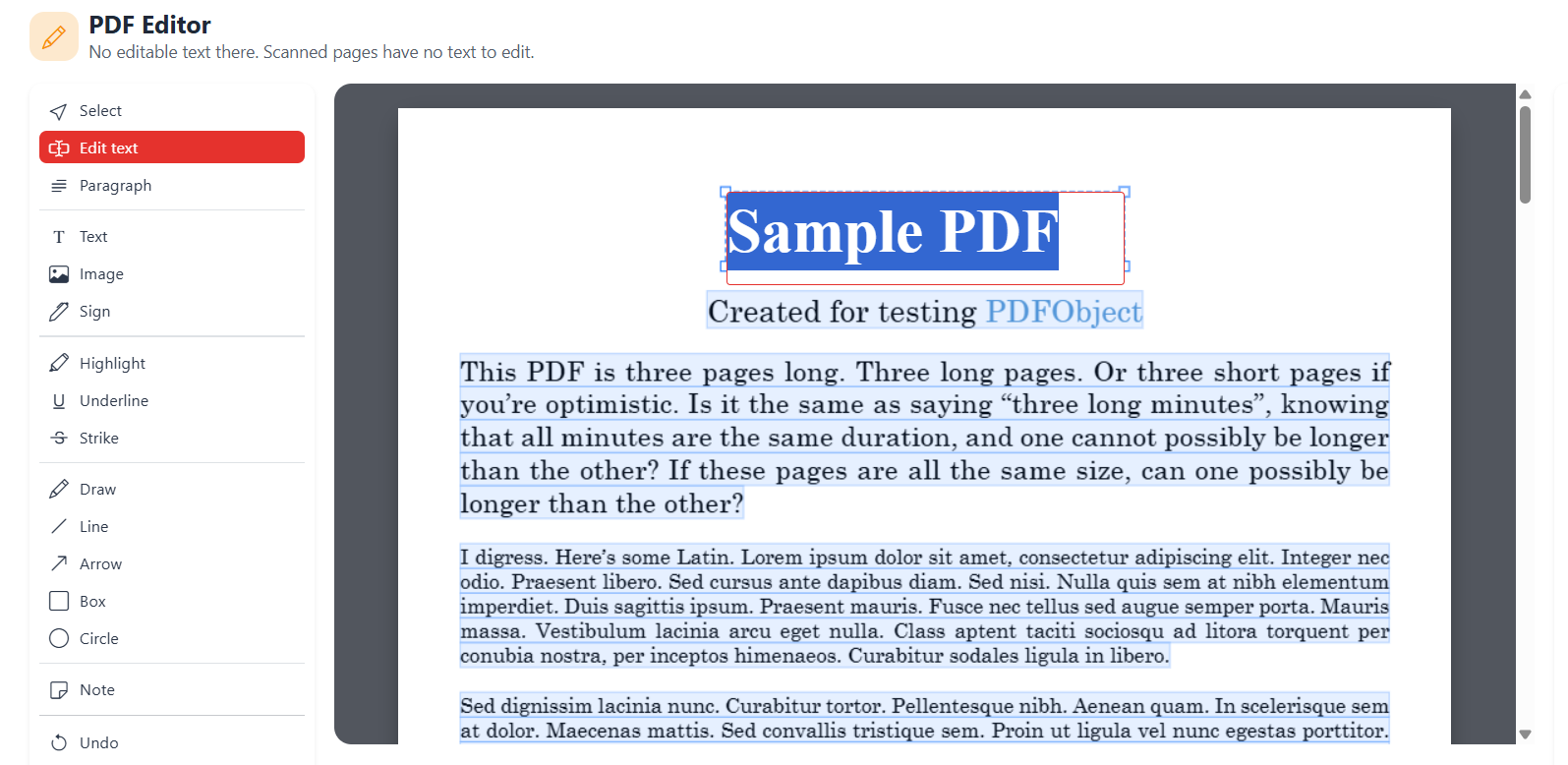
This is worth calling out because it trips people up: the main editor is built for adding things to a page, not rewriting what's already printed on it. If you drag a text box onto an existing line, you'll just get two overlapping bits of text.
For that, Easy PDF Editor has a dedicated Edit PDF Text tool. It highlights the existing wording so you can click a line and retype it directly — useful for correcting a date, a price, or a name without disturbing the rest of the layout.
| Mode | Best for |
|---|---|
| Edit text | Swapping out a single line. Keeps the original size, spacing, colour, and baseline, so a same-length replacement lands cleanly on the old letters. |
| Edit paragraph | Rewriting a whole block. Text re-wraps as you type, growing or shrinking the paragraph, with a warning line if it starts overlapping content below. |
Handy Things You Can Do With It
Because the editor is essentially a blank canvas over your PDF, it covers a wide range of everyday fixes:
- Filling in a printed form by typing directly into the blanks
- Adding a logo or stamp to a letterhead or invoice
- Covering private details - draw a filled white box over anything you don't want visible
- Marking up a design with arrows, circles, or notes
- Correcting a date or price using the text-editing mode
A Few Things to Know Before You Start
- Signing is built in. There's a dedicated signature panel where you can draw with your mouse, type your name in a handwriting-style font, or upload a signature image (a transparent PNG works best). If you only need a signature and nothing else, the standalone Sign PDF tool is a faster route.
- Removing content means covering it. There's no true "delete this paragraph" - the standard trick is a filled white box placed over whatever you want gone.
- Your changes are permanent in the file. Once saved, anyone who opens the PDF sees exactly what you placed - it's baked into the document, not an overlay only you can see.
- It works on mobile, including touch input, though a larger screen makes precise placement easier.
- Files are handled privately. Uploads are processed and then automatically deleted rather than stored.
When You Might Want a Different Tool
The Edit PDF tool is great for one-off visual changes, but it's not built for everything PDF-related. If your task is closer to one of these, Easy PDF Editor has a dedicated tool that will save you time:
Bottom line: for quick, visual fixes - a logo here, a covered-up detail there, a signature on the dotted line - the PDF Editor is a genuinely useful free tool with no catches attached.
Try the PDF Editor →